This blog is subject the DISCLAIMER below.

Monday, December 07, 2009

How to Get User Friends\Followers on Twitter

Twitter became very popular social network, all use it for different purposes i.e to expand your network, to market for your products, to be up-to-date with specific technology, or to know what people talking about is.
Developers are users but on Twitter and Facebook they are not regular users, Twitter for example gives you some APIs to develop you own application and extend Twitter with features, it's time for everybody to extend without waiting for creators to do.
I was developing Twitter application two days ago, and I faced a problem to get all user's friends\followers, I used some APIs but unfortunately, they got first 100 friends\followers!! I knew that you can browse user friends\followers for user called "RamyMahrous" like that http://twitter.com/statuses/friends/ramymahrous.xml?
http://twitter.com/statuses/followers/ramymahrous.xml?
But it gets just first 100 friends\followers I browsed some sites but no information, unless I went to Twitter API Wiki and I knew about XML cursor they use every cursor has limited 100 friends\followes means... if "RamyMahrous" has 204 friends so it will be iterated through 3 cursors.
Let's code...
string FriendsXMLFileURL = "http://twitter.com/statuses/friends/{0}.xml?cursor={1}";
string FollowersXMLFileURL = "http://twitter.com/statuses/followers/{0}.xml?cursor={1}";
List < users_list > listUserList = new List < users_list > ();
int index=0;
XmlSerializer Serializer = new XmlSerializer(typeof(users_list));
List < users_list > listUserList = new List < users_list > ();
List < users_listusersuser > users = new List < users_listusersuser > ();
users_list usersList = new users_list();
int index = 0;
string nextCursor = "-1";
while (nextCursor != "0")
{
usersList = (users_list)Serializer.Deserialize(
XmlReader.Create(string.Format(FollowersXMLFileURL, "RamyMahrous", nextCursor)));
listUserList.Add(usersList);
nextCursor = usersList.next_cursor;
}
//user_list class generated based on the xml structure you can save the xml file and generate it
//using XSD please take alook on this post by Shady
http://fci-h.blogspot.com/2009/12/how-to-create-c-class-from-xml-file-via.html
foreach (users_list userlist in listUserList)
{
users.InsertRange(index, userlist.users[0].user);
index += 100;
}
//so now you've list of users you can iterate and do anything with them!
//take a look this brings user friends\followers without providing user password!
Your comments are welcome :)

.. more.

Saturday, December 05, 2009

How to create a C# Class from XML file (via xsd.exe)

A friend asked me a couple of times about how to I created the class I used in “twitter common friends” to handle xml as objects (includes reading & writing back). Actually the tool (xsd.exe) is pretty simple & takes no more than a couple of commands to create the class for me.

It’s just that I usually forget the keywords/parameters & their order (you can create a dataset or class that can be C# or VB, & there’s a couple of other option I never used before). I usually refer to its MSDN page when asked..

So I thought a post would be easier to remember. First you should create the xsd file out of the xml, using the VS command prompt:

xsd myFile.xml

That will create “myFile.xsd”, now to create “myFile.cs”, write the below line:

xsd myFile.xsd /c

Now you can add the cs file to your project & use it as illustrated in my previous post.

.. more.

Saturday, November 28, 2009

Generating DAL using CodeSmith and .Nettiers (step by step)

Here is a post for generating DAL (Data Access layer) using CodeSmith and .Nettiers for any C# project. This post is a part of document guide I have written for a client of my company.


For whom don't know what is Codesmith :
CodeSmith is a software development tool to help you get your job done faster. Technically speaking it is a template driven source code generator that automates the creation of common application source code for any language (C#, Java, VB, PHP, ASP.NET, SQL, etc.).(http://www.codesmithtools.com/)

And .Nettiers :
.netTiers utilizes the power of the best code generation tool available today, CodeSmith. .netTiers generated architecture is custom to your domain, uses familiar patterns, and follows the guidance of Microsoft's recommended patterns and practices. In fact, the .netTiers base architecture is built upon the Microsoft Enterprise Library Application Blocks.(http://nettiers.com/)

Note : these steps captured with CodeSmith 3.2 and .NetTiers but almost versions are the same.

Opening CodeSmith 3.2:

1. After setup the CodeSmith 3.2, open it from the start menu.

2. If you haven’t license, you can continue with the trial version by pressing “Try” button.


3. From the File menu of CodeSmith press “Open” and select the Nettiers.cst inside NetTiers 2.2.0 folder.


4. Open the configuration XML file and change the connection string as in the picture(if you haven't Configuration file or this is first time to work with that drop this step).
5. From the Properties Tab click the open icon then select the configuration XML file(if you haven't Configuration file or this is first time to work with that drop this step).
6. Configure the Properties Tab then Press the run icon.

7. Be sure that no errors in the generated report and open the solution file (generated in the output directory).

8. Build the whole solution.

9. After the build succeed open(your output directory\your RootNameSpace.Data.SqlClient\bin\Debug ) and get the following three DLLs to import them in your own project as the generated DAL (Data Access Layer) .
• your RootNameSpace.Data.dll
• your RootNameSpace.Data.SqlClient.dll
• your RootNameSpace.Entities.dll

Happy Coding :)

.. more.

Wednesday, October 21, 2009

Wondering about Project Managers

I had a couple of issues lately with a PM (Project Manager) at work which made me ask myself a couple of questions & wonder what others might be thinking of it.. I'll give my humble opinion here to start a conversation, coz I badly wanna here how others would answer them.

  • Should PMs know/ask much about technical decisions?
    • IMHO, I thing the answer is NO!! PMs should be asking for less fine details like what's the estimations for doing that option or so.. But they shouldn't be asking why we are using X, or Y technology/approach to tackle a problem.

  • In an agile process, where should PMs stand? What exactly is their Role? Should there be PMs in agile in the first place? Or Should they be replaced by a PO (Product Owner), or -may be- a Scrum Master?
    • That's a question that really confuses me a lot.. I can't give a definite answer.. Should they replace POs.. Hmm. I guess not.. On one hand, a PO should be the one directing the project, knowing what the customer want.. But still, a PO -probably- should have some technical background.. So according to my answer to the previous question, PMs can't replace POs..
    • On the other hand, Replacing a Scrum Master, is a bit too far for PMs, Scrum Master are supposed to be in favor of the development team, ie a facilitator & protector for the dev team; & PMs are notorious of failing to do so.. :D
    • Another option -that just came to me right now- is PMs replacing customer in environments where it's difficult to involve the customer.

I'm desperately waiting for your answers to either of the above questions.. I'm really confused & don't have enough knowledge actually to answer them.
I might be adding other questions but for now that's what is on my mind..

.. more.

Sunday, October 18, 2009

Deploying Reports in Reporting Services Programmatically

May be it's my bad luck may be something else, but I didn't find a complete post how to deploy Reports, and Data Sources in Reporting Services in away like BIDS.

First it's a tool I developed to automate the deployment of BI solution (Creating Data warehouse, installing SSIS packages, creating Jobs, create Cubes and installing reports on Reporting Services Server).

If you don't have time to read and just need to download the tool, here you're
Source Code: http://cid-3e2288e7a8e55f56.skydrive.live.com/self.aspx/Public%20folder/Deploying%20Reports%20in%20Reporting%20Services%20Programmatically.zip

Herein, I'll talk about the last thing which is deploying reports.

P.S: It's my way in designing such task (Installing reports on Reporting Services Server) and it's not standard or anything else just (follow your heart :))


Let's begin, I assume you, me, or anybody else has these 3 XML files one for folders, one for data sources and one for reports.

[caption id="attachment_772" align="aligncenter" width="450" caption="Folders' XML Scheme"]Folders XML File Scheme[/caption]

Name: Folder name to be created on Reporting Services.
ParentFolder: '/' means on the top == no parent folder.

[caption id="attachment_773" align="aligncenter" width="450" caption="Data Sources' XML Scheme"]Data Sources' XML Scheme[/caption]

Name

Folder

Description

HideInListView

Enabled

ConnectionString

Extension

CredentialRetrieval

WindowsCredentials

ImpersonateUser

ImpersonateUserSpecified

Prompt

UserName

Password

EnabledSpecified

Name: Data Source name to be created on Reporting Services.
Folder: The folder in which Data Source should be in, if we use '/' means on the top == no parent folder.
Description: Data Source Description.
HideInListView: True to hide it in the Reporting Services, otherwise False.
Enabled: True to be enabled, otherwise not enabled.
ConnectionString: Data Source connection string.
Extension: Configured according to the provider for more details see below table...


ProviderExtension
Microsoft SQL ServerSQL
OLE DBOLEDB
Microsoft SQL Server Analysis ServicesOLEDB-MD
OracleORACLE
ODBCODBC
XMLXML
SAP NetWeaver BISAPBW
Hyperion EssbaseESSBASE

CredentialRetrieval: How Data Source will retrieve the credential.
WindowsCredentials: True to use Windows credential otherwise it'd use the credential provided in this XML (Username, and Password).
ImpersonateUser: Indicates whether the report server attempts to impersonate a user by using stored credentials after a data processing extension has established an authenticated connection to a data source.
ImpersonateUserSpecified: Gets or sets a value that indicates whether the ImpersonateUser property is specified.
Prompt: Gets or sets the prompt that the report server displays to the user when prompting for credentials.
UserName: Gets or sets the user name that the report server uses to connect to a data source.
Password: Sets the password that the report server uses to connect to a data source. Write-only.
EnabledSpecified: Gets or sets a value that indicates whether the Enabled property is specified.

More details on these properties http://msdn.microsoft.com/en-us/library/reportservice2005.datasourcedefinition_properties.aspx

[caption id="attachment_774" align="aligncenter" width="450" caption="Reports' XML Scheme"]Reports' XML Scheme[/caption]

Name: Report Name.
Path: .RDL file path.
Folder: The folder in which Report should be in, if we use '/' means on the top == no parent folder.
DataSource: Report's Data Source name of Reporting Services.

And these configuration keys

[caption id="attachment_777" align="aligncenter" width="450" caption="Configuration keys"]Configuration keys[/caption]

ReportsXMLFilePath: Reports' XML File Path
DataSourcesXMLFilePath: Data Sources' XML File Path
FoldersXMLFilePath: Folders' XML File Path
ReportingServerURL: URL of Reporting Services

Open visual studio and create a C# console application (we don't need any interaction with user everything configured in the application configuration file)

From the project main menu Add Web Reference or Add Service Reference then Advanced then Add Web Reference...

[caption id="attachment_778" align="aligncenter" width="450" caption="Add Web Reference"]Add Web Reference[/caption]

[caption id="attachment_779" align="aligncenter" width="450" caption="Add Reporting Services Reference"]Add Reporting Services Reference[/caption]

URL: http://{Server-Name}/reportserver/ReportService.asmx
Web reference name: Give it meaningful name..

What we did is adding web service by which we can talk to Reporting Services to ask it to do something like (create report, create data source, etc...).

Let's write some very simple C# code
We have method called DeployReports this method calls 3 other methods in order (CreateFolders, CreateDataSources, and CreateReports)
/// <summary>

/// Deploys Folders, DataSources, and Reports in Reporting Services by values configured in the application configuration file.

/// </summary>

private void DeployReports()

{

CreateFolders(

ConfigurationSettings.AppSettings["FoldersXMLFilePath"]);

CreateDataSources(

ConfigurationSettings.AppSettings["DataSourcesXMLFilePath"]);

CreateReports(Report.GetReports(

ConfigurationSettings.AppSettings["ReportsXMLFilePath"]));

}


/// <summary>

/// Creates Folder in Reporting Services.

/// </summary>

/// <param name="folderXMLFilePath">XML file path holds folder information.</param>

private void CreateFolders(string folderXMLFilePath)

{

ReportingService reportingServicesClient =

new ReportingService();

reportingServicesClient.Credentials = System.Net.CredentialCache.DefaultCredentials;

XDocument xmlDoc = XDocument.Load(folderXMLFilePath);

try

{

var result = from c in xmlDoc.Descendants("Folder")

select new

{

name = (string)c.Element("Name").Value,

parentFolder = (string)c.Element("ParentFolder").Value

};

foreach (var row in result)

{

reportingServicesClient.CreateFolder(row.name, row.parentFolder, null);

Logging.Log(string.Format("Folder {0} created successfully", row.name));

}

}

catch (Exception er)

{

Logging.Log(er.Message);

}

}

/// <summary>

/// Creates Data Sources in Reporting Services.

/// </summary>

/// <param name="datasourceXMLFilePath">XML file path holds Data Sources information.</param>

private void CreateDataSources(string datasourceXMLFilePath)

{

ReportingService reportingServicesClient =

new ReportingService();

reportingServicesClient.Credentials = System.Net.CredentialCache.DefaultCredentials;

DataSourceDefinition tempDataSource;

XDocument xmlDoc = XDocument.Load(datasourceXMLFilePath);

try

{

var result = from c in xmlDoc.Descendants("DataSource")

select new

{

name = (string)c.Element("Name").Value,

folder = (string)c.Element("Folder").Value,

description = (string)c.Element("Description").Value,

hideInListView = (string)c.Element("HideInListView").Value,

enabled = (string)c.Element("Enabled").Value,

connectionString = (string)c.Element("ConnectionString").Value,

extension = (string)c.Element("Extension").Value,

credentialRetrieval = (string)c.Element("CredentialRetrieval").Value,

windowsCredentials = (string)c.Element("WindowsCredentials").Value,

impersonateUser = (string)c.Element("ImpersonateUser").Value,

impersonateUserSpecified = (string)c.Element("ImpersonateUserSpecified").Value,

prompt = (string)c.Element("Prompt").Value,

userName = (string)c.Element("UserName").Value,

password = (string)c.Element("Password").Value,

enabledSpecified = (string)c.Element("EnabledSpecified").Value

};

foreach (var row in result)

{

CredentialRetrievalEnum credentialRetrieval;

EnumConverter ec =

new EnumConverter(typeof(CredentialRetrievalEnum));

credentialRetrieval = (CredentialRetrievalEnum)ec.ConvertFromString(row.credentialRetrieval);

tempDataSource = new DataSourceDefinition();

tempDataSource.CredentialRetrieval = credentialRetrieval;

tempDataSource.ConnectString = row.connectionString;

tempDataSource.Enabled = bool.Parse(row.enabled);

tempDataSource.EnabledSpecified = bool.Parse(row.enabledSpecified);

tempDataSource.Extension = row.extension;

tempDataSource.ImpersonateUserSpecified = bool.Parse(row.impersonateUserSpecified);

tempDataSource.ImpersonateUser = bool.Parse(row.impersonateUser);

tempDataSource.Prompt = row.prompt;

tempDataSource.WindowsCredentials = bool.Parse(row.windowsCredentials);

//tempDataSource.UserName = row.userName;

//tempDataSource.Password = row.password;

try

{

reportingServicesClient.CreateDataSource(row.name, row.folder, true, tempDataSource,

null);

Logging.Log(string.Format("Data Source {0} has created successfully", row.name));

}

catch (SoapException e)

{

Logging.Log(e.Detail.InnerXml.ToString());

}

}

}

catch (Exception er)

{

Logging.Log(er.Message);

}

}

/// <summary>

/// Creates Reports in Reporting Services.

/// </summary>

/// <param name="reports">XML file path holds Reports information.</param>

private void CreateReports(Report[] reports)

{

ReportingService rsc =

new ReportingService();

rsc.Credentials = System.Net.CredentialCache.DefaultCredentials;

foreach (Report aReport in reports)

{

Byte[] definition = null;

Warning[] warnings = null;

try

{

FileStream stream = File.OpenRead(aReport.Path);

definition = new Byte[stream.Length];

stream.Read(definition, 0, (int)stream.Length);

stream.Close();

}

catch (IOException e)

{

Logging.Log(e.Message);

}

try

{

rsc.CreateReport(aReport.Name, aReport.Folder, true, definition, null);

#region Setting Report Data Source

DataSourceReference reference = new DataSourceReference();

reference.Reference = aReport.DataSource;

DataSource[] dataSources = new DataSource[1];

DataSource ds = new DataSource();

ds.Item = (DataSourceDefinitionOrReference)reference;

ds.Name = aReport.DataSource.Split('/').Last();

dataSources[0] = ds;

rsc.SetReportDataSources(aReport.Folder + "/" + aReport.Name, dataSources);

#endregion

if (warnings != null)

{

foreach (Warning warning in warnings)

{

Logging.Log(string.Format("Report: {0} has warnings", warning.Message));

}

}

else

Logging.Log(string.Format("Report: {0} created successfully with no warnings", aReport.Name));

}

catch (SoapException e)

{

Logging.Log(e.Detail.InnerXml.ToString());

}

}

}


Report\Logger Class will be attached in the Source code...

I don't see any tough code to explain any developer familiar with C# will understand it very well, but if you have any question please feel free to ask me.


.. more.

Sunday, October 11, 2009

Table-Value and Temp Tables

Table-Value Parameters
Table-value parameters offer more flexibility and better performance than temporary tables to pass a list of parameters. Table-value parameters do not acquire locks for the initial population of data from a client and do not cause a statement to recompile.

Table-value parameters offer the following benefits:
·Provide a simple programming model.
·Enable inclusion of complex business logic in a single routine.
·Reduce round trips to the server.
·Include a table structure of different cardinality.
·Enable strongly typed and set-oriented queries.
·Enable the client to specify sort order and unique keys.

Table-value parameters have the following restrictions:
·Statistics are not maintained on columns of table-value parameters.
·Table-value parameters must be passed as input READONLY parameters to Transact-SQL routines.
·DML operations such as UPDATE, DELETE, or INSERT cannot be performed on a table-value parameter in the body of a routine.
·Table-value parameters cannot be used as the target of a SELECT INTO or INSERT EXEC statement. Table-value parameters can be in the FROM clause of SELECT INTO, or in the INSERT EXEC string or stored procedure.

Source: http://bit.ly/3rmMLK

.. more.

Saturday, September 12, 2009

Reading POP3 (secure) SSL like Gmail via C#

Friend of mine asked me about reading messages by pop3 protocol using C#code. After I did some search in Google I got a lot of pop agents that working fine but not with Gmail as it uses secure connection (SSL) so I did new search in google and sourceforge but most of them have exceptions or not working fine and this is the main reason for this post to continue work from the point I have stoped.

After a hard search in alot of pages I got two good result :
1- it is a good project (from this blog) have good description that implements the standard POP3 commands like authenticating, receiving stats, retrieving and deleting messages .

2-There are open source project called OpenPOP in sourefourge but have bugs and fixed (here) in this blog by Kiran banda,unfortantualy it have build errors but i fix it (here) but it needs some work to go live.

Related post :
Reading Atom feed of Gmail inbox via C#


.. more.

Friday, September 11, 2009

Reading Atom feed of Gmail inbox via C#


Today I am coming with Gmail feature that may be useful although many people don't know and how to access it via simple C# code.
Gmail Atom feed is xml format file to know the unread messages .

http://mail.google.com/mail/feed/atom/ shows the most recent unread items from your inbox. Gmail also offers feeds for your labels:http://mail.google.com/mail/feed/atom/labelname/ .
To know the feature in detials go to this link @ (the unofficial news and tips about Google).

As a developer you can download the C# example here.
All what you need is create instance a simple class called GmailHandler and drop this lines in your project.


//just 2 steps to get your Gmail Atom
//1- Create the object from GmailHandler class
GmailHandler gmailFeed = new GmailHandler("WriteHereYourGmailUserName(ex: fci-h)", "WriteHereYourGmailPassword(ex: XXX)");
//2-get the feed :) ,Congratulations
XmlDocument myXml = gmailFeed.GetGmailAtom();


Just happy code :)

.. more.

Thursday, September 10, 2009

Backup and Restore SQl Server DB by c#

In this post I am going to talk about SQL server DB backup and restore via C#.
lets get into the code.

First thing, you have to reference the following two references

  1. Microsoft.SqlServer.ConnectionInfo
  2. Microsoft.SqlServer.Smo
--------------------------------------------------------------------

1) Create a connection to the SQL Server

private static Server CreateServerConnection(string ServerIP, string SQLInstanceName, string userName, string password)
{
try
{
// Create a new connection to the selected server name
ServerConnection srvConn = new ServerConnection(ServerIP+ @"\" + SQLInstanceName);

// Log in using SQL authentication instead of Windows authentication
srvConn.LoginSecure = false;

// Give the login username
srvConn.Login = userName;

// Give the login password
srvConn.Password = password;

// Create a new SQL Server object using the connection we created
return new Server(srvConn);
}
catch (Exception ex)
{
// Handle Exceptions
}

}
--------------------------------------------------------

2) Perform DB Backup

/// The name of the .bak file
/// SQL Server instance name
/// The name of the Db we want to backup
/// serverIP">IP of the server where the SQL server installed
/// for sql Authentication, example sa
/// Password of the DB user

public static void BackUpDB(string backUpFileName, string SQLInstanceName, string DBName, string serverIP, string userName, string password)
{
try
{
Backup bDatabase = new Backup();

// Set the backup type to a database backup
bDatabase.Action = BackupActionType.Database;

// Set the database that we want to perform a backup on
bDatabase.Database = DBName;

// Set the backup device to a file
BackupDeviceItem bkDevice = new BackupDeviceItem(backUpFileName, DeviceType.File);

// Add the backup device
bDatabase.Devices.Add(bkDevice);

//Check if the file exists
if (File.Exists(backUpFileName))
File.Delete(backUpFileName);

// Perform the backup
bDatabase.SqlBackup(CreateServerConnection(serverIP, SQLInstanceName, UserName, password));

}
catch (Exception ex)
{
// Handle Exceptions
}
}
-------------------------------------------------------------------

3) Perform DB Restore

/// the .bak file
///
///
///
///
///

public static void RestoreDB(string restoreFileName, string SQLInstanceName, string DBName, string serverIP, string userName, string password)
{
try
{

Restore rDatabase = new Restore();

// Set the restore type to a database restore
rDatabase.Action = RestoreActionType.Database;

// Assign a db to restore operation
rDatabase.Database = DBName;

// Set the backup device to restore from file
BackupDeviceItem bkDevice = new BackupDeviceItem(restoreFileName, DeviceType.File);

// Add the backup device to the restore type
rDatabase.Devices.Add(bkDevice);

// Replace the Db if already exists
rDatabase.ReplaceDatabase = true;

if (File.Exists(restoreFileName))
// restore
rDatabase.SqlRestore(
CreateServerConnection(serverIP, SQLInstanceName, userName, password));
}
catch (Exception ex)
{
// Handle Exceptions
}

}

---------------------------------------------------

That's it

.. more.

Wednesday, September 09, 2009

Want to learn SQL Server Data Services (SDS)?

Overview of Microsoft SQL Server Data Services
This 1-hour online clinic provides SQL Server developers who are experienced in implementing database solutions with an overview of SQL Server Data Services (SSDS).

The topics covered in the clinic include:
- Introduction to SSDS
- SSDS Object Model
- Working with SSDS

More on: http://learning.microsoft.com/Manager/ResourceDetails.aspx?resourceId=cbe836be-394e-4a23-9f87-5d12127cccd5&clang=en-US&brand=Learning

Developing an Application for Microsoft SQL Server Data Services
This 1-hour online clinic provides SQL Server developers who are experienced in implementing database solutions with an explanation of the knowledge and skills required to develop an application in SQL Server Data Services (SSDS).

Topics covered in the clinic include:
- Building an SSDS Application
- Enhancing an SSDS Application

More on: http://learning.microsoft.com/Manager/ResourceDetails.aspx?resourceId=9b2d7204-9f2e-4657-a4c7-0952b32ae081&clang=en-US&brand=Learning

More on SQL Azure Database: http://www.microsoft.com/azure/data.mspx

.. more.

Wednesday, August 19, 2009

Disabling the mouse right click : JavaScript

As mention in the title here is code to disable the right click for the mouse in the browser (tested in IE ).
The code is JavaScript ,the code is readable and can be used to handle other mouse events.
just call DisableRightclick() once in your page.


[script language="javascript" ]
var IE;
var NN;
function right(click)
{
if(IE && (event.button==2 || event.button==3))
{
alert("The right click has been disabled here.");
return false;
}

if(NN && (click.which==2 || click.which==3))
{
alert("The right click has been disabled here.");
return false;
}

return false;
}

function
DisableRightclick()
{


if(navigator.appName=="Microsoft Internet Explorer")
{
IE=true;
}

if(navigator.appName=="Netscape")
{
NN=true;
}


if (document.layers) window.captureEvents(Event.MOUSEDOWN);
if (document.layers) window.captureEvents(Event.MOUSEUP);
document.onmousedown=right;
document.onmouseup=right;
window.document.layers=right;
}
[/script]

.. more.

Check Acrobat Reader (PDF) installed : JavaScript with IE

Here you can find helper function I got by Google and do some changes to it to be suitable for me .It checks if the Acrobat Reader is installed in the browser or not (it tested on IE6 and IE7 with Acrobat 6 and 7).
Function returns : true for OK else false .

function CheckPDF()
{
var isInstalled = false;
var version = null;
if (window.ActiveXObject)
{
var control = null;
try {
// version 7
control = new ActiveXObject('AcroPDF.PDF');
}
catch (e)
{
// Do nothing
}
if (!control)
{
try {
//version 6
control = new ActiveXObject('PDF.PdfCtrl');
}
catch (e)
{
return false ;
}
}
if (control)
{

return true ;
}
else
{
return false ;
}
}
}

.. more.

Saturday, August 15, 2009

Integrating SSIS with C# to deliver very scalable Data-Driven Solution

نوضح في هذه المقاله استخدام ال SSIS لبناء C# application to get very scalable data-driven solution و كيفيه ارتباط ال C# بالـ SSIS

ما هم ال SSIS ؟؟ كيفيه الحصول عليه ؟؟ وماهي مميزاته؟؟ وفيما يستخدم اكثر؟؟

اولا SSIS تعني SQL Server Integration Services وهى احدى منتجات ميكروسوفت ويأتي مع جميع نسخ ال SQL Server ما عدا ال Express كان يسمى فيما سبق DTS لكن SSIS يعتبر منتج جديد وليس تحديثا من ال DTS

هي اداه قامت ميكروسوفت بتطويره و اخراجه للسوق عام 2007 وتهدف الى نقل البيانات من اكثر من Data Repository الى Data Repository اخر مثلا نقل البيانات من ملف نصي، ملف Excel او قاعاده بيانات SQL or Access الى جدول في قاعده بيانات في ال SQL Server دون الحاجه لوجود SQL Server ولا يجب مصدر البيانات او وصول البيانات SQL Server بأختصار يكمن استخدمها لنقل البيانات من ملف نصي الى قاعده بيانات Oracle تعتبر ال SSIS اداه ETL (Extract, Transform, and Load) اي انها تقوم بأخد البيانات من المصادر تحسين البيانات بشكل وتنظيمه وبعد هذا نقلها الى نقطه الوصول.

.. more.

Friday, July 03, 2009

Building ASP.NET Reporting OLAP-Based Application Part-3

In the previous two posts building the Cube and building the Report, we discovered how BIDS helps in developing BI applications in robust, managed and organized way. I believe if you have few BI concepts you can do this walkthrough in 10 minutes.
Let’s come to the last layer which I see it’s the presentation layer. One question may come to your mind why I build ASP.NET application over Reporting Service? Why I don’t give the end user Reporting Service Server URL. Because of security? NO. Reporting Service Server can manage different types of security which doesn’t put headache on your development team but what if your end user need UI layer say in Silverlight? How can you embed in the Reporting Service. We have ReportViewer Windows\Web control which provides a very rich of functionality to View Reporting Service (Local and Server) Reports. In our walkthrough we use Server Report.
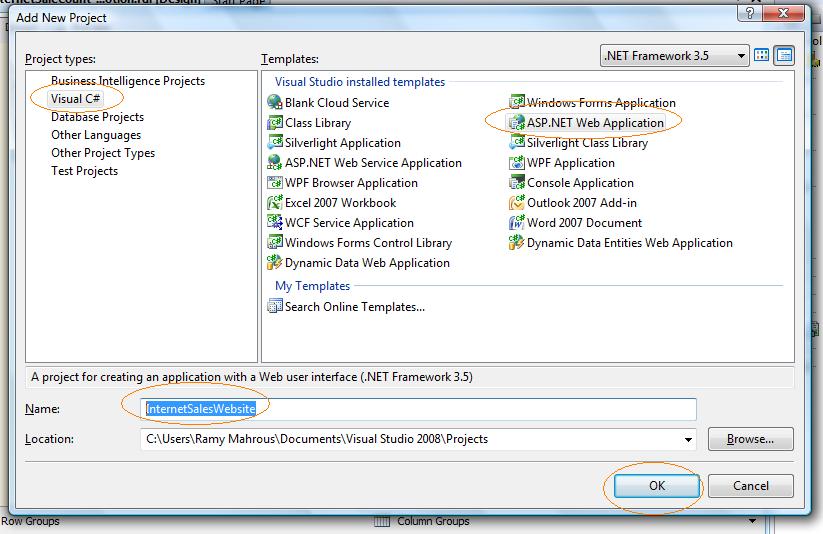
Let’s open our previous solution and add a new ASP.NET web application project: InternetSalesWebsite
Default.aspx page open in source view, switch to Design view.

rs-p3-1

.. more.

Building ASP.NET Reporting OLAP-Based Application Part-2

In the previous post we learned how to build simple cube using BIDS, and if you’re follower I’ve forgot something important is deployment the cube on the Analysis Services.
1-We just need to add some attributes to the dimensions(DimPromotion, DimProduct) as each of which pure (contains just the key) for some reasons we need to show the user the name of product, or the promotion because it very hard to make human treat with numbers contrary to machines which prefer them. We shall add some attributes to the dimensions to make it meaningful.

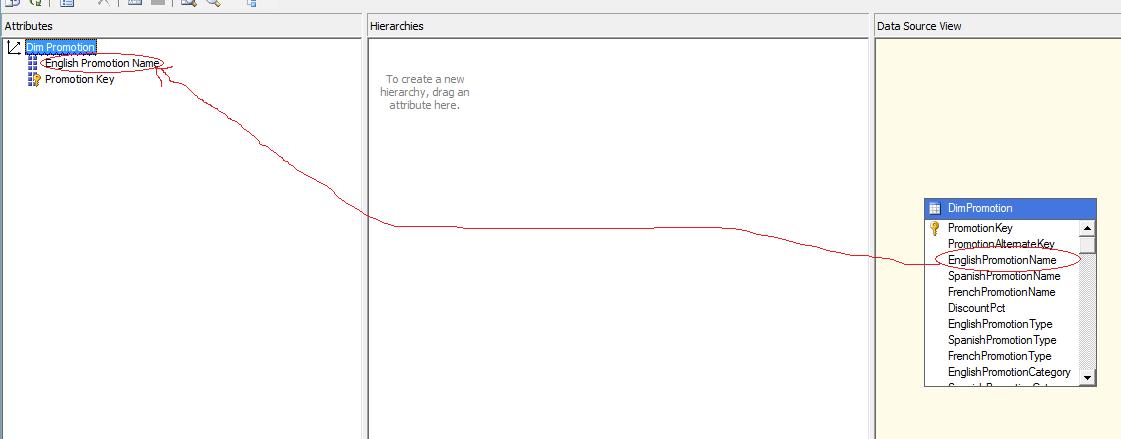
2-Double click on DimPromotion; the dimension design window opened you find Data Source View, Hierarchies and Attributes; simply drag EnglishPromotionName from the Data Source View table to Attributes.
3-Repeat the previous step with the DimProduct to add EnglishProductName

rs-p2-7

.. more.

Building ASP.NET Reporting OLAP-Based Application Part-1

Here I’ll talk about how to integrate your asp.net application with Reporting Service through ReportViewer web control which provides rich functionality to deliver Reporting Service Report through asp.net applications.

In real life applications; Analysis Service and Reporting Service on server machine, Web Server another server machine and clients usually on another domain access the website to do something.

Let’s take a look on this diagram to visualize what happened in intra applications which one of its functionality shows reports this reports actually based on OLAP Data (SSAS used here)

Infrastructure Architecture


Here we build OLAP Cube as Report data source.

So, let’s begin to build our report based on Cube which built from AdventureWorksDW

.. more.

Wednesday, June 17, 2009

ASP.NET 4.0 and its confliects with ASP.NET 2.0

The application domain or application pool is currently running version 4.0 or later of the .NET Framework. This can occur if IIS settings have been set to 4.0 or later for this Web application, or if you are using version 4.0 or later of the ASP.NET Web Development Server. The element in the Web.config file for this Web application does not contain the required 'targetFrameworkMoniker' attribute for this version of the .NET Framework (for example, ''). Update the Web.config file with this attribute, or configure the Web application to use a different version of the .NET Framework.

You may get this error if you installed Visual Studio 2010.
Today I published a website (ASP.NET 2.0) and uses Application Pool ASP.NET V2.0, and when I browsed it; it got that error.
Simply I press right click on the virtual directory (My website) under Default Web Site, properties ->ASP.NET, I found it uses ASP.NET Version 4.0, I changed it to ASP.NET 2.0 -> Apply, message box appears says
Changing the Framework version requires a restart of the W3SVC service. Alternatively, you can change the Framework version without restarting the W3SVC service by running: aspnet_regiis.exe -norestart -s IIS-Viirtual-Path
Do you want to continue (this will change the Framework version and restart the W3SVC service)?
I said OK, but it didn't change its version and it needs me to do some action
Start->All programs->Visual studio 2008->Visual Studio Tools->Visual Studio 2008 Command Prompt -> write this command ->
Aspnet_regiis.exe -s W3SVC/1/ROOT/My website
It then works well.

.. more.