This blog is subject the DISCLAIMER below.
Showing posts with label .NET Q and A. Show all posts

Wednesday, September 15, 2010

SQLServer : How to know the last modified table in your DB

Here is simple T-SQL tip but great to be known. It was part of my task today :). It was making auditing tables for tables created after specific date.

Select * from sys.objects where type_desc= 'USER_TABLE' ORDER BY modify_date desc

type_desc : is object type in SQL and here we wrote 'USER_TABLE' as we need tables created by user.

.. more.

Monday, September 13, 2010

Do people in non-English-speaking countries code in English?

I was reading a question with the same name on Stack-Exchange Beta site for Non-programmer-related questions (aka Programmers) when I came across this answer posted by a (probably Ukrainian) developer named Igor.

Accompanied by an earlier attempt by a colleague at work to write an enum in Arabic, I tried to write this piece of code:

Strangely enough it compiled and even ran showing the expected output (10)!! Note, the order above of the 2nd & 3rd line is mingled due to RTL issues in Gist. Visual Studio will show it in the right order (or at least, a more readable order for me, copy it & past it in your IDE to know how it looks).

Off course, I’m pretty convinced that this isn’t the best practice you should follow, (check my answer to the same question). Yet, I find this really hilarious! As a matter of fact, I took the claim that it’s bad practice too much for granted to the extent that I’ve never even tired to write such a strange piece of code :D

.. more.

Tuesday, May 25, 2010

How to consume REST based-services?

Q. How to consume REST based-services?
Assume we have REST based-service contains method Add which takes two operands op1 and op2 and return the summation.

A. Create any project type (Console, Windows or even Web-based application)
Add using System.Net; using System.IO;
Write some code to consum the service
string parameters;
string response;
// Create the request obj
WebRequest request = WebRequest.Create("serviceURL/Add");
// Set values for the request back
request.Method = "POST"; //REST based-services using Post method
request.ContentType = "application/json"; //tells request the content typs is JSON
parameters = "{\"op1\":2,\"op2\":\"1\"}";
request.ContentLength = parameters.Length;
// Write the request
StreamWriter requestWriter = new StreamWriter(request.GetRequestStream(), System.Text.Encoding.ASCII);
requestWriter.Write(parameters);
requestWriter.Close();
// Do the request to get the response
StreamReader responseReader = new StreamReader(request.GetResponse().GetResponseStream());
response = responseReader.ReadToEnd();
responseReader.Close();
//response value should be 3 if you implement Add method correctly :))

.. more.

Saturday, December 05, 2009

How to create a C# Class from XML file (via xsd.exe)

A friend asked me a couple of times about how to I created the class I used in “twitter common friends” to handle xml as objects (includes reading & writing back). Actually the tool (xsd.exe) is pretty simple & takes no more than a couple of commands to create the class for me.

It’s just that I usually forget the keywords/parameters & their order (you can create a dataset or class that can be C# or VB, & there’s a couple of other option I never used before). I usually refer to its MSDN page when asked..

So I thought a post would be easier to remember. First you should create the xsd file out of the xml, using the VS command prompt:

xsd myFile.xml

That will create “myFile.xsd”, now to create “myFile.cs”, write the below line:

xsd myFile.xsd /c

Now you can add the cs file to your project & use it as illustrated in my previous post.

.. more.

Tuesday, April 28, 2009

How to create SQL Server Login programmatically?

Q. How to create SQL Server Login programmatically?

I got this question from Daniweb C# forum, and of course when I need to do something against SQL Server object from .net I go to SMO (SQL Server Management Objects) which provides a great functionalities to do anything with SQL Server instead of going on SSMS and create some scripts then embedding them into stored procedure then call it…. off…

Anyway to avoid showing how much I’m talkative…

Create any C# project type (Windows, Class Library or even Console one), add reference to Microsoft.SqlServer.Smo, Microsoft.SqlServer.ConnectionInfo
and Microsoft.SqlServer.SqlEnum

Server sqlServerInstance = new Server(                 new Microsoft.SqlServer.Management.Common.ServerConnection(                 new System.Data.SqlClient.SqlConnection("Data Source=.;Initial Catalog=Master;Integrated Security=True")));// your connection string I place mine for illustration..             Login loginObj = new Login(sqlServerInstance, @"DomainName\UserName");             loginObj.DefaultDatabase = "Master";             loginObj.LoginType = LoginType.WindowsUser;             loginObj.Enable();             loginObj.Create("password"); //set the password             //there're many properties to do some tasks related to Login object...

If you used LoginType.WindowsUser, be sure to provide valid windows username and if you aren’t on Domain use the machine name instead.


If you need to create SQL login use LoginType.SqlLogin…


You can explore Login class more on http://msdn.microsoft.com/en-us/library/microsoft.sqlserver.management.smo.login.create.aspx

.. more.

Sunday, November 30, 2008

How to restrict some users to update some tables under some criteria?

Q. How to restrict some users to update some tables under some criteria?

A. If you administer SQL server database, you know that you can grant\deny user updating some tables, but what if you wish to grant\deny user updating some tables when just column equal some value, scenario like that

Table Course (ID, CourseName)

Table Student (ID, Name, CourseID, ….)

Sure, the most common example we give when we teach someone the introduction of databases especially relationships, so if you don’t know it; in brief Student has right to have some courses and the relationship is one-to-many; course-took by- many students.

1

Going on our scenario, data entry1 responsible for insert\update\delete all students take C# course, data entry2 responsible for insert\update\delete all students take Java course
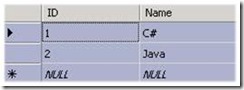
2 3

Clear, isn’t it?

What you should do is to create 2 users dataentry1, and dataentry2 and to create 2 database roles CSharpController, and JavaController.

To create user using SQL Server Management Studio [URL]

To create Database Role using SQL Server Management Studio [URL]

Assign dataentry1 to CSharpController role, and dataentry2 to JavaController, you can assign more users to proper role as you see.

Next step; when user does insert\update\delete operation on Student table, users belong to CSharpController have right if and only if CourseID = 1, and the same for JavaController if and only if CourseID = 2

So, let’s write some code or script; yes, trigger to do those validations

create trigger ManageDML_Student
on student
for insert, delete, update
AS

--here to get column value and assign it variable to check its value later

IF IS_MEMBER ('CSharpController') = 1 && --value == 1--
  commit transaction
else
rollback transaction

Thanks :)


Acknowledge
I'd like to thank Mohamed Abd ALLAH Hewedy, he helped me through this problem

.. more.

Friday, August 15, 2008

How to use dataset and adapters with stored procedures?

Q: How to use dataset and adapters with stored procedures?

A: I've asked this question two times today, and for that I thought to do a post and send the link better to answer everyone separately..

Right now, I've be_settings table, its schema (SettingName nvarchar(50) and SettingValue nvarchar(MAX)) what I need is to create stored procedure to get SettingName and SettingValue when the SettingValue = some value

SP  

then let's go to Visual Studio and create windows application and drop DataGridView on the form; press on the smart arow located on its top right, new dialog appears, choose to add new data source->Add project data source->Database

dataconnection

next->next->

databaseobjects

then finish...

Your form should look like

after choosing datasource

in Load data onClick event handler, write this code

code to load data

Just, Ctr + F5 and lets test our work

result

Hope, I answered your question ",)

Tip: if you using Windows Vista you need to run Visual Studio and SQL Server as administrator....

.. more.

Sunday, May 18, 2008

How to delete all data from controls in opened forms using C# ???

I will separate this problem into two tasks :
I- Delete all data from one form ( main form )
II- Reaching to other open forms and delete their data .
but before starting , first create a form contain
some combo box ,text box , labels and one button
I- Delete all data from one form ( main form ) :

insert this code in the button you created ( clear button )


private void Clear_Click(object sender, EventArgs e)

{

Control.ControlCollection cc;
cc = this.Controls; // to get all controls of your form

foreach (Control ctrl in cc)

{

string type = ctrl.GetType().ToString();
switch (type)
{
case "System.Windows.Forms.ComboBox":

ComboBox cb = ctrl as ComboBox;

cb.SelectedIndex = -1;

break;

case "System.Windows.Forms.TextBox":

TextBox tb = ctrl as TextBox;

tb.Clear();

break;

case "System.Windows.Forms.Label":

Label L = ctrl as Label;

L.Text = "";

break;

}

}

}


II- Reaching other open forms and delete their data :

its the easy part , just replace one line code and add a for loop .

replace this line :

cc = this.Controls;

with this line :

cc = Application.OpenForms[i].Controls;

* Application.openforms[i] to reach to all open forms


private void Clear_Click(object sender, EventArgs e)

{

for (int i = 0; i <>

Control.ControlCollection cc;

cc = Application.OpenForms[i].Controls;

//cc = this.Controls;

// previous code
}

}

}


.. more.

Friday, May 16, 2008

How to make your controls moveable?

Q: How to make your controls moveable?


A: Some people need to add style to their controls to be moveable that's users can drag and drop them anywhere on the form.So, when user presses on a control and moves the mouse; control location should equal mouse axis.

Some variables used in our code.


/// <summary>
/// Indicates whether control is pressed by mouse or not
/// </summary>
bool IsDraged = false;

/// <summary>
/// Holds the X-coordinate of the control
/// </summary>
int Control_X = 0;

/// <summary>
/// Holds the Y-coordinate of the control
/// </summary>
int Control_Y = 0;


This is the mouse down event handler, we just checked the left button is pressed then set boolean variable IsDraged to true and assigned control location to mouse location.


private void Control_MouseDown(object sender, MouseEventArgs e)
{
if (e.Button == MouseButtons.Left)
{
IsDraged = true;
Control_X = e.X;
Control_Y = e.Y;
}
}


Just when mouse left button released we set IsDraged to false.


private void Control_MouseUp(object sender, MouseEventArgs e)
{
if (e.Button == MouseButtons.Left)
{
IsDraged = false;
}
}


Here's when mouse moves while mouse left button not released yet, the computation used helps controls to move smoothly with the mouse movement.


private void Control_MouseMove(object sender, MouseEventArgs e)
{
if (e.Button == MouseButtons.Left)
{
Control active = (Control)sender;
if (IsDraged)
{
active.Left += e.X - Control_X / 12;
active.Top += e.Y - Control_Y / 12;
Control_X = e.X;
Control_Y = e.Y;
}
}
}

.. more.

Sunday, April 27, 2008

How to save image in SQL Server database?

Q: How to save image in SQL Server database?

A: It's the most common question asked in technical forums, the answer is so simply is to convert your image to binary and save the equivalent binary data to the database.

I am expecting you know how to Insert\get data to\from SQL Server.

To convert image to binary you need to write this piece of code

   1: System.IO.FileStream fs = new System.IO.FileStream(@"ImagePath", System.IO.FileMode.Open);
   2:             byte[] imageAsBytes = new byte[fs.Length];
   3:             fs.Read(imageAsBytes, 0, imageAsBytes.Length);
   4:             fs.Close();


You need a table with column of binary\image datatype to be able to insert the equivalent binary data of image.

And what about retrieving binary data to be converted to image

You just need to initiate new Image from MemoryStream object which takes array of bytes as an argument -Array of bytes comes from SQL Server-


1: Image img = Image.FromStream(new System.IO.MemoryStream(imageAsBytes));


.. more.

Friday, April 25, 2008

How to bind ComboBox to an array of object?

Q: How to bind ComboBox to an array of object?

A:

Assume we have class like Student class

   1: public class Student
   2:     {
   3:         int id;
   4:  
   5:         public int ID
   6:         {
   7:             get { return id; }
   8:             set { id = value; }
   9:         }
  10:         string firstName;
  11:  
  12:         public string FirstName
  13:         {
  14:             get { return firstName; }
  15:             set { firstName = value; }
  16:         }
  17:         string lastName;
  18:  
  19:         public string LastName
  20:         {
  21:             get { return lastName; }
  22:             set { lastName = value; }
  23:         }
  24:  
  25:         public string FullName
  26:         {
  27:             get { return firstName + " " + lastName; }
  28:         }
  29:  
  30:         public Student(int id, string firstName, string lastName)
  31:         {
  32:             this.id = id;
  33:             this.firstName = firstName;
  34:             this.lastName = lastName;
  35:         }
  36:     }


what we need is to bind an array of Student to ComboBox and let the ComboBox shows the student FullName and bind their IDs to be used later.


So, what we need is to use some ComboBox properties like DisplayMember and ValueMember


   1: Student[] students = new Student[3];
   2:  
   3:             students[0] = new Student(1, "Ramy", "Mahrous");
   4:             students[1] = new Student(2, "FCI", "Helwan");
   5:             students[2] = new Student(3, "X", "Y");
   6:  
   7:             comboBox1.Items.AddRange(students);
   8:             
   9:             comboBox1.DataSource = students;
  10:             comboBox1.ValueMember = "ID";
  11:             comboBox1.DisplayMember = "FullName";


And now, ComboBox shows the FullName without overriding ToString method which is not the solution if we need to bind some properties.


Untitled

.. more.