This blog is subject the DISCLAIMER below.

Saturday, February 17, 2007

Windows Presentation Foundation part 1

In this post, I will speak about the Windows Presentation Foundation (or WPF) which is one of the most important technologies in .NET framework 3.0.
Before beginning in WPF, we have to reply on some questions:
What is Microsoft .NET Framework 3.0? And what is the difference between it and previous releases?

Briefly, the Microsoft .NET Framework 3.0 (formerly WinFX), is the new managed code programming model for Windows. It combines the power of the .NET Framework 2.0 with four new technologies: Windows Presentation Foundation (WPF), Windows Communication Foundation (WCF), Windows Workflow Foundation (WF), and Windows CardSpace (WCS, formerly “InfoCard”).

Use the .NET Framework 3.0 today to build applications that have visually compelling user experiences, seamless communication across technology boundaries, the ability to support a wide range of business processes, and an easier way to manage your personal information online.

Windows Presentation Foundation (WPF)
The Windows Presentation Foundation (or WPF), formerly code named Avalon, is the graphical subsystem feature of the .NET Framework 3.0 and is directly related to XAML "Extensible Application Markup Language ". It is pre-installed in Vista the latest version of the Microsoft Windows operating system.

WPF is also available for installation on Windows XP SP2 and Windows Server 2003. It provides a consistent programming model for building applications and provides a clear separation between the UI and the business logic.

A WPF application can be deployed on the desktop or hosted in a web browser. It also enables richer control, design, and development of the visual aspects of Windows programs.
It aims to unify a host of application services: user interface, 2D and 3D drawing, fixed and adaptive documents, vector graphics, raster graphics, animation, data binding, audio, and video.

There are a number of development tools available for developing Windows Presentation Foundation applications.
One of the good tools is Microsoft Expression Blend.To download it, please follow the installation instructions:

http://www.microsoft.com/products/expression/en/expression-blend/try.mspx
This was just introduction to WPF.
To be continued….

.. more.

Types of web site in ASP.NET 2.0

In the name of Allah ,
1- File system Web sites .
2- Local IIS Web sites .
3- FTP Web sites .
4- Remote Web sites .

This are types of web site that you can develop it by ASP .NET 2.0 as illustrate in picture .This article will be useful isA , if you interest to know the different between them , want to know why this types or want increase your knowledge .

1-Local IIS Web sites :
First of all to create a local Web site:
  • *you need to have administrative rights (Windows administrator) .
  • *you must have IIS installed on your computer.
Local IIS Web sites store the pages and folders in the IIS default directory structure (that is, \Inetpub\wwwroot). By default, Visual Studio creates a virtual directory under IIS. However, you may create a virtual directory ahead of time and store the code for your Web site in any folder. The virtual directory just needs to point to that location. One important reason to create a local Web site is to test your application against a local version of IIS, for example, if you need to test such features as application pooling, ISAPI filters, or HTTP-based authentication. Even though a site is accessible from other computers, it's often much easier to test these aspects of your application when you can see it interact with IIS on your computer.

2-File System Web Sites :
  • *File system Web sites live in any folder you specify .The folder may be on your local computer or on another computer sharing that folder.
  • *File system Web sites do not require IIS running on your computer. But , you run pages by using the Visual Studio Web server( Visual Studio 2005 includes its own built-in Web server. This lets you develop Web applications effectively even if you don't have IIS installed on your development machine).
Form File System Web Sites advantage is you may develop your Web site on your computer even when logged on as a user without administrative rights. This scenario is only useful for developing and testing those features of your site that you develop. Because IIS is out here, you won't be able to work with (or have to deal with) such IIS features as ISAPI filters, application pooling, or authentication.

3-FTP Web Sites :
Via Visual Studio you can create HTTP-based sites or manage Web sites available through an FTP server. For example, if you use a remote hosting company to host your Web site, an FTP offers a way to move files back and forth between your development location and the hosting location. You then use Visual Studio to manage the content on the remote FTP server.
  • *You might use this option to test the Web site on the live server where it will actually be deployed.
  • *By default, Visual Studio logs you in to the FTP server as an anonymous user. However, some FTP servers require you to provide a username and password. In that case, you can deselect the Anonymous Login option and then enter your username and password. The username and password are saved until you end the Visual Studio session.
4-Remote Web Sites
  • *Remote Web sites use IIS on another computer that is accessible over a local area network.
  • *To create this type of web site, FrontPage Server Extensions must be installed on the remote computer.
  • *By default, a web application that you create on a remote server doesn’t have the permissions needed to change files in the web site at runtime. If an application needs to change a file, then, you’ll need to contact the system administrator about giving it the appropriate permissions.
This option is useful if you decide you want to test the Web site on its actual deployment server. In addition, the entire development team can work on the site simultaneously.
My source :
http://en.csharp-online.net/How_to_Test_and_Debug_an_ASP.NET_Application%E2%80%94How_to_create_a_remote_IIS_web_site

.. more.

C# Software Transactional Memory

Software Transactional Memory (STM) is an API for multithreaded computation in which shared data is synchronized without using locks. Threads synchronize by means of memory transactions, short-lived computations that either commit (take effect) or abort (have no effect). Transactions avoid the well-known problems of locking, including deadlock, priority inversion, and fault-intolerance. The SXM is a software transactional memory package written in C#. It is much easier to use than prior STMs because it uses Reflection.Emit to transparently add synchronization code to sequential data structures.
More on here
From Microsoft Research website

.. more.

Friday, February 16, 2007

Building your CV

1- You don't know what career to choose.
2- You don't know how to build your CV.
3- Strange Education.Can't write cover letter.

Download this file and enjoy ......
http://www.hasebat.com/OldWebsite/bo/doc_file/career.zip

.. more.

Thursday, February 15, 2007

Suggestions

This post is dedicated for your suggestions. You are free to express what you like/don't like in the comments as well as suggest new ideas on how to improve it.

FCIH Bloggers

.. more.

What happens behind the scene??!

Did you think a day what happens when you create a windows application and run it?

Did you think what function(s) called to show you the form with the controls associated with it?

I know I know, you think or thought in that... me too, back to old days, I remembered something, Shreef Sakr and I were working on Visual Studio.net 2003 in our FCI-H lab. I noticed that Shreef writing some lines of code, I've attracted then I've asked him what's this?

He replied "I saw in MSDN this class StackTrace, and I am still discovering it"

Today in the meeting with Hanaa, I remembered this class and I decided to write about it.

No..., I did not forget, did you think a day how many functions should be called to show you a simple form? so think, if you did not. Guess!.... your answer may be 1, 2, 3 or even 4 functions, but my answer is main, Run, form constructor, addcontrols, initializecomponent and load.

We got the big zero :-), although C# is not open source but you can easily know what's happen behind the scene and StackFrame can remove the curtain to see, so the answer is little weird. To show a simple form, just 22 functions called.

Show me!
public Form1()
{
InitializeComponent();
}

private void Form1_Load(object sender, EventArgs e)
{
ShowMeWhatHappend();
}
/// Shows me the name of functions called in the stack frame till execution of
/// ShowMeWhatHappend
public void ShowMeWhatHappend()
{
int counter = 0;
System.Diagnostics.StackTrace ST = new StackTrace();
System.Diagnostics.StackFrame[] SF = ST.GetFrames();
foreach (StackFrame sf in SF)
{
System.Reflection.MethodBase MB = sf.GetMethod();
listBox1.Items.Add(MB.Name);
counter++;
}
label1.Text += counter;
}

23, because of ShowMeWhatHappend calling.

.. more.

What's new in C# 3.0 ? Part 5

Lambda Expressions : -

in earlier versions of C# when we were using delegate it was like that : -
suppose the delegate for multiply function.

in C# 1.0
first , i would create a delegate of type int

delegate int MathOp ( int x , int y ) ;
MathOp Multiply = new Mathop ( Multiply) ;
Console.Write(Multiply( 2 , 3 ) ;

Sure first you must make function Multiply :D

Private int Multiply ( int x , int y )
{
return x*y;
}

then it became more easy with the anonymous methods in C# 2.0

if i will use this method for once i don't have to declare methods and ....
anonymous methods allow us to make it as a block of code like this :-

delegate int MathOp ( int x , int y ) ;
MathOp Multiply = delegate ( int x , int y )
{
return x*y;
}
Console.Write(Multiply( 2 , 3 );

then it became more and more easy with Lambda Expression in C# 3.0

MathOp Multiply = ( x , y) => x*y;
Console.Write(Multiply( 2 , 3 );

So whats going on ?
on the left hand side : - we wrote the declared delegate and the name of the function
on the right hand side : - we wrote the parameters which we will apply the operation on them followed by the arrow followed by the operation.

hint : - if the code more than one line make them in a scope by { }.

this was the last post about C# 3.0 hope it was useful for you, and c u in another topic Soon isA.

.. more.

Wednesday, February 14, 2007

What's new in C# 3.0 ? Part 4

in this post i will speak about 3 small things:-
1: - Object initializers.
2: - Query expression.
3:- implicitly typed arrays.

1: - Object initializers :-
Now i can initialize any public property in object construction, so there is no need to write multiple
constructors like this eg ..

point p = new point { x = 5 , y = 9 } ;
button btn = new button { Text = "username" , Width = 20 , Height = 5 } ;
and so on .. where Text,Widht and Height are Public properties in the Button Class.


2: - Query expression :-
i will explain it directly in a small example : -

from c in students
where c.Name == "BillGates"
select c.address.
now this became apart of C# syntax now we can get a compilation error if i wrote wrong
statement ( in the previous versions of C# we were writing it between " ".
the query expression not just for sql statements but also i can use it in my arrays or any structure i made in my code.
( really this is great ) .

3 : - implicitly typed arrays :-
it is same as implicitly typed variable the type of the array is inferred from the initialization value like this :-
var a = new [] { 1, 2, 3 } ; //array of intergers.
var b = new [] { "hi","man"}; // array of srings.
var c = new [] { 1, 2, "kkk"}; // Compilation error.

That’s it.
See you in the Next Part isA

.. more.

MDC07 - Day3 Slides updated

Those are some slides for presentations held on Day3:

Ngen to build more performant managed applications by Surupa Biswas
JIT-ing (Dynamic Compilation for managed code) by Surupa Biswas

Enjoy them :)

.. more.

Get your Video Series: SQL Server 2005 Express Edition for Beginners CD

We would like to announce about we have downloaded “Video Series: SQL Server 2005 Express Edition for Beginners”
So, for whom they like to take it, kindly, drop a comment! just to know the number of people, 3rd year students have higher priority as they study Microsoft SQL Server 2000
So, volunteers who will burn more CDs kindly, drop a comment!
Actually there are 5 CDs for anyone and 5 CDs for volunteers (who should copy at least one CD for other people)

.. more.

Announcement

Now you can access our blog through www.hasebat.com

Dr. Ayman Ezzat (Teaching Assistant in our faculty) has forwarded his domain www.hasebat.com to our blog. So now you can access our blog through this domain.

Many thanks to him.

Dr.Ayman's Web site: http://www.iplab.cs.tsukuba.ac.jp/~ayman/

.. more.

Tuesday, February 13, 2007

INotifyPropertyChanged

If you know it, do not go through. This article just points to the importance of INotifyPropertyChanged and how to use it in our real world.


Almost of us use OOP technique so GUI in place and objects in other. And frequently GUI should response to objects updates.


I do not know how many lines I should write to update GUI when a specific object updates if I do not use INotifyPropertyChanged


So, let’s demonstrate how to use it

1-using System.ComponentModel;

2-Let’s your specific class inherit from INotifyPropertyChanged interface and expose its member public event PropertyChangedEventHandler PropertyChanged


3-Create your function to fire the event.


4-In each property you need to be in synchronization with GUI in your class in its setter call the function you have created in point 3


After following my instruction I managed to write these lines:


using System.ComponentModel; //point 1

class Person:INotifyPropertyChanged //point 2

{


string name;

public string Name
{


get { return name; }


set { name = value;

OnPropertyChanged("Name");//point 4


}


}


protected void OnPropertyChanged(string property)//point 3

{

if (PropertyChanged != null)

{

PropertyChanged(this,new PropertyChangedEventArgs(property));
}


}

public event PropertyChangedEventHandler PropertyChanged;//point 2


So, whenever person name has changed I’ll know that.


I’ll write a function in the Form class that uses this event and responses to it.

Person p = new Person("FCI-H", 1);

nameTxt.Text = p.Name;

p.PropertyChanged += new System.ComponentModel.PropertyChangedEventHandler(p_PropertyChanged);

void p_PropertyChanged(object sender, System.ComponentModel.PropertyChangedEventArgs
e)

{

switch (e.PropertyName)

{

case "Name":

nameTxt.Text = p.Name;

break;
}

}

So, whenever person name changed, Form textbox (nameTxt) will have the recent value, without writing additional code


You can download the full and commented sample from here


.. more.

What's new in C# 3.0 ? Part 3

assume you want to make a fly variable(which i will use it once in my code) of complex type, all what i have to do is go to the solution explorer and add a new class for this type, by this way if i want to make 10 new types i will make 10 different class, but this is not the best solution so C# 3.0 came with the the best solution with the Anonymous Type.

now i don't have to write a class foreach type i wanna use, the compiler will do this for my :)
eg .. i want to make a new type which will hold my firstname , lastname and my age
it will be like this :-
var UserData = new {Fisrtname = "Mohamed", LastName = "Gamal" , age = 19 };

in the compilation time the compiler will generate a temp class for this type , the Members of this class is a Read\Write properties which inferred from the Object initializer (i will speak about it in another post isA ).
back to our example .. here the compiler will make 3 properties in this class, 2 of type string and the third of type int, the compiler can do this job during the compilation time depending on the initialization value.

by this way i don't have to generate classes for fly variables and this increases the code readability and save many lines of code to be written.


That’s it.
See you in the Next Part isA


.. more.

Singularity: A research OS written in C#

Yes, it's an OS written using managed code with C#.

Here are some videos that illustrate how this idea works and provides some demonstrations of it in action

Singularity: A research OS written in C#

Singularity Revisited

Singularity III : Revenge of the SIP

Singularity IV: Return of the UI

And here is the link i got the videos from it: channel9.msdn.com

This videos are part of a series called: Going Deep which contains many videos illustrating the Internals of Windows, Research projects as well as some future products.

Enjoy it :)

.. more.

Monday, February 12, 2007

Video Series: SQL Server 2005 Express Edition for Beginners

Getting Started with SQL Server Express

This video series is designed specifically for SQL Server beginners—individuals who are interested in learning the basics of how to create, manage, and connect to SQL Server Express databases. Whether you’re just a beginner or somewhat familiar with databases, these video lessons will help you get better acquainted with SQL Server 2005 Express.

Getting Started

The series includes almost 9 hours of video-based instruction that walks SQL Server beginners through the steps of learning about SQL Server databases to actually connecting a SQL Server database to a Web application. Select your starting point below based on your skill set.
Introduction
Learning Video 1: What is a database?
Designing Tables
Learning Video 2: Understanding Database Tables and Records
Learning Video 3: More about Column Data Types and Other Properties
Learning Video 4: Designing Relational Database Tables
Database Functions
Learning Video 5: Manipulating Database Data
Learning Video 6: More Structured Query Language
Learning Video 12: Creating and Using Stored Procedures
Learning Video 13: Enabling Full-Text Search in your Text Data
Creating and Using Reports
Learning Video 10: Getting Started with Reporting Services
Learning Video 11: Embedding, Packaging and Deploying SQL Server Express Reporting Services
Database Security
Learning Video 7: Understanding Security and Network Connectivity
Database Management
Learning Video 9: Using SQL Server Management Studio Express
Publishing to the Web
Learning Video 8: Connecting your Web Application to SQL Server 2005 Express Edition

For more information, here

.. more.

Data Normalization

Abstract:
After gathering required information from end-users who are going to use your application, you move to design database and you should spend sometime to design it well because any mistake in your design would cost you a lot of effort, money and time if your application built on it…

Introduction:
Data Normalization is the process of organizing information in your database to should be able to develop professional code to update and retrieve data efficiently and your code comes from a series of rules of standards called NORMAL FORMS

FIRST NORMAL FORM:
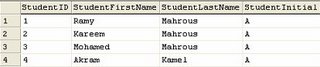
Let's execute that code [SELECT * FROM student] so the output is


It's definitely wrong as what about if I want to sort by Student's Last Name I have no way except writing functions to do this job and that's wrong

After modification solution is:
Let's execute that code [SELECT * FROM student] so the output is


So now it's very easy to make all operations I need to sort by any attribute and update and retrieve needed data

Let's execute that code [SELECT * FROM student] so the output is


Unquestionably very wrong to do that for many reasons first of them I can not count all students who take Microsoft SQL Server 2005 course second what about if a student intend to take another course you need to modify the schema or the design of the relation and never ever put yourself in a case according to it you may change your database schema, believe me if you did, you would be fired, assume well to design well…

After modification solution is:


Now I can count all students who take any specific course and also update data smoothly without any modification in database schema

So we can summarize FIRST NORMAL FORM as:

1- Each attribute in a relation should contain only one piece of information that you can care about.
2- And also each piece of in formation that you can care about should be contained in just ONE attribute.

SECOND NORMAL FORM:
It focuses on relation itself and its concepts are:

1- Database must be in FIRST NORMAL FORM.
2- Every attribute should be functionally dependant on the entire primary key.
3- Every relation should model just one entity, object or event.

Let's execute that code [SELECT * FROM student] so the output is


According to SECOND NORMAL FORM concept we see that relation violate SECOND
NORMAL FORM as CourseName dependant on to primary keys they are StudentID and
CourseID

After modification solution is to have two tables one for
StudentCourse and one for Course respectively as shown


Here, we divided first table to two tables to avoid violation of SECOND NORMAL FORM as in last table CourseName became just dependant on CourseID.

THIRD NORMAL FORM:
Let us show what the concepts of the THIRD NORMAL FORM

1- Database must be in SECOND NORMAL FORM.
2- The attributes in addition to be dependant on entire primary key it should not be dependant on another attributes.

3- Don't store any calculated or derived values, only store the raw data and use queries to perform calculations and looks up as needed.

Let's execute that code [SELECT * FROM Item] so the output is


Here, all attributes dependant on ItemID as it's the primary key of this table however the problem is in TotalCost as you see TotalCost is a calculated value result FROM multiplication of ItemCost by ItemQuantity and that's a violation of THIRD NORMAL FORM.

Conclusion:
As we saw applying normalization to our design is very easy and logical but also not applying it will cost us a lot and a lot, and while designing large database you will find some difficulty to achieve the equation that you must attain performance, normalization, efficiency, all end-users requirements and so forth so they are cases you should DENORMALIZE your design i.e. what about if end-user asked you to store calculated or derived values in this case if you didn't find solution you would be forced to say "Ok".

In the article I just mentioned 3 forms of NORMALIZATION and there are other forms like Boyce-Codd normal form – BCNF, Forth normal form - 4NF and fifth normal form - 5NF, may next article will mention them in details

.. more.

Saturday, February 10, 2007

Source Control and Team Development Part 4

See previous parts here

The Only Chapter


In the first meeting, you defined a set of features, classes, and functional tests. You got Class A and Class B. You go home. You start writing a set of unit tests for your features. You write a skeleton of your classes. Just empty functions that returns dummy values. You compile, it compiles fine. Now you Check-In your files to the Source Control Server; just a single click. Before the check-in starts, unit tests are run, of course non of them are passed; you only have skeleton classes. Now check-in is complete. You go to sleep.
Next day you wake up, open you PC, in your home. You click "Update" to get the latest version of other people source code. Then you continue developing your classes. You implement seven functions. You compile, test, and find that 30% of tests have been passed. You check-in your code with a message stating a description of the change.

After 3 days, you find that some previously-passed tests have failed. You browse the history of the class that have failed the test, you click a single button and you have a side-by-side view of the current file version and the last-working version. The changed lines are highlighted for you. You compare only 3 lines, and decide to change one of them, and viola: that test have been passed again. You check-in your code with a message stating the correction.

Now you go to the second failed test, you remember that you have made a change that corrected that before and that maybe you have removed that change forgetting what it was for. You perform a search of the check-in messages using the keyword you used for that change, you got the file version that has that bug corrected, the exact lines that you changed to fix that bug is highlighted for you. You fix the current version with that code, and here it is; the test have been passed. You check-in your code with a message saying that you re-fixed that bug again.

Someday you find something inside someone else's code that preventing your code from working. You fix it in his file. You check his file in with a message describing your change. When he checks-in his file with different changes, the server merges both of your files if you haven't modified the same lines. The server lets him know that he doesn't have the latest version and that a merge will happen, he previews the merge and approves it.

The big day has come. You sit together, you don't have anything to do. The project was already integrated each day, and all the tests have been passed, you just go to college and get the maximum grade and go home having 4 feelings:
1- I love programming
2- We CAN make things right
3- I WANT to make a much bigger project next time
4- "Weeee are the champions"

See:

Test-Driven Development
Source Control

Other team management stuff:

Scrum

Other development techniques:

Extreme Programming (XP)

Finally, this is all about Agile Software Development

Big thanks to the MDC 2007 ;)

.. more.

Source Control and Team Development Part 3

See part 1 here
See part 2 here

Chapter 7

Suddenly some remembers that he has the flash memory that they used to transfer the last working version of the file. He gets is and replaces the non-working file, compiles, runs, and there it is. It works now. Still it doesn't have the bugfix that they wanted to restore.

They accept that, and prepare to go to college, each one thinking how they are going to hide that bug from being noticed, or how they would convince the professor to have mercy on them if he noticed it.

Later that night, each one of them have four feelings:
1- I hate programming
2- We can never make anything right
3- I won't spend much effort in such project again
4- WE ARE LOSEEERS :'(

The End

So what we have here ??
We have people who lost self-confidence thus will never be able to make something big, not because they can't, but only because either they don't want to, or they believe they can't.

So, what's the solution ? What do these people who make big software do ? Can this scenario ever be different ??

"Yes, sure it can be different, those people are just idiots!" Says someone smartly "They could've named the folders better!!"

Well, there is indeed a different scenario. But it is not like that smart one said.
This scenario is MUCH shorter than the former. It even consists of only one chapter.

To be con... Ops, sorry, I mean see the next article :D


.. more.

Unit Test

Testing, testing, and testing, the most important phase especially in case working with group

So, testing anything before delivering it, is equal to develop it itself. And to avoid what
happens in teams refer to TeamDevelopment to know.

In this article, I’ll demonstrate the basic test that applied on functions in particular public functions and the called Unit Test. (Private functions will be the next)

Walk with me to test these simple functions:

public static int Add(int op1, int op2)
{
return op1 + op2;

}
public static int Subtract(int op1, int op2)
{
return op1 - op2;

}
public static int Multiply(int op1, int op2)
{
return op1 * op2;
}public static int Divide(int op1, int op2)
{
return op1 / op2;

}
static void Main(string[] args)
{
Console.WriteLine(
"Add: " + Add(5, 0));
Console.WriteLine(
"Subtract: " + Subtract(5, 0));
Console.WriteLine(
"Multiply: " + Multiply(5, 0));
Console.WriteLine(
"Divide: " + Divide(5, 0));
}

Good, but something waiting you

So, I’ll try and catch the Divide function to not get this error.


But till now I give up fatal error, what about logic error, should I write a program to test my function to by passing different parameters each time, yes, I should, what Unit Test actually do is that plus some information.

So, in our Math library, right click on any public method then select Create Unit tests, a cute dialog appeared in tree mode (Project, namespace, Class, Members, Methods) we then select Divide method to apply unit test on it, NOO, do not press Ok, we almost done, below output project: select create a new visual C# test project, enter a name for this unit test project say, DivideMethodUnitTest.

Going to Solution Explorer, we notice a new project has been added, yes, it’s DivideMethodUnitTest test project. It contains a class called [YourClassNameTest]
open it

[TestMethod()]

public void DivideTest(){//some code}

It generates a method to test Divide method, and some code, we going to put our
edits

int op1 = 5; // TODO: Initialize to an appropriate value
int op2 = 0; // TODO: Initialize to an appropriate value

int expected = 0;
int actual;
actual = UnitTestSample.Math.Divide(op1, op2);


Right click on DivideMethodUnitTest test project and select Set as startUp project, Ctr + F5 Test result window opened to inform me that the test has been faild : double click on failed it opens new windows contains some information about what has happened

Error Message:
Test method DivideMethodUnitTest.MathTest.DivideTest threw exception: System. DivideByZeroException: Attempted to divide by zero..

So, what should I do now is to catch this error, after that I’ll go to retest Divide method, and Comment Assert.Inconclusive(“A method…..”);


int op1 = 5; // TODO: Initialize to an appropriate value
int op2 = 0; // TODO: Initialize to an appropriate value
int expected = 0;
int actual;
actual = UnitTestSample.Math.Divide(op1, op2);

Congrats, your test window tells you Passed, double click on passed, it tells you Standard Console Output: Attempted to divide by zero

By passing more parameters I can get the logic error and the unit test informs me about that
int op1 = 5; // TODO: Initialize to an appropriate value
int op2 = 1; // TODO: Initialize to an appropriate value
int expected = 2;
int actual;
actual = UnitTestSample.Math.Divide(op1, op2);

Again, the test has been failed double click on failed it opens new windows contains some
information about what has happened


Error Message:
Assert.AreEqual failed. Expected:<2>, Actual:<5>. UnitTestSample.Math.Divide did not return the expected value.

So, give the right op1, op2, and expected values, to check for logic error

.. more.

Friday, February 09, 2007

What's new in C# 3.0 ? Part 2

Consider the following , iam working in a project and i made a class and i made a simple method inside this class after small period i wanted to modify or add something in this method all what i have to do just back to the code of this function and modify its code , this is good

but what if this Method was in dll or was in a sealed class or i wanted to add method in a class of the primitive data types ? what can i do ?? the Extension Method was the Solution.

eg.. i want to add a small Method to the string type which return the second word in a given string
it will be like this

static class beta
{
public static string GetSecondWord(this string input)
{
string y="";
int count = 0;
bool flag = false ;
foreach (char c in input)
{
if (c == ' ')
{
flag = true;
count++;
}
if (flag == true && count == 1)
{
if( c != ' ')
y += c;

}
}
return y;
}
}


Notes :
  1. Make sure that the class is static
  2. Add this keyword before the type of the argument you want to extend.
so now you can write this code,

string x = "some string value";
string y = x.GetSecondWord();
That’s it.
See you in the Next Part isA


.. more.