Day 1 [Sunday: 25-7-2010]: Let's get started | ||
10:00 | 10:30 | Orientation |
10:30 | 12:30 | Object Oriented Blocks |
12:30 | 01:00 | Break |
01:00 | 02:30 | Good Code |
02:30 | 03:00 | Break |
03:00 | 04:00 | English for Business |
Day 2 [Monday: 26-7-2010]: Develop your path | ||
10:00 | 11:30 | Web Development A – Z |
11:30 | 12:00 | Break |
12:00 | 02:00 | Software Quality Engineering |
02:00 | 02:30 | Break |
02:30 | 04:00 | CV Writing and interviewing skills |
Day 3 [Wednesday: 28-7-2010]: IT, World of Endless Choices | ||
10:00 | 11:00 | GIS: Geographic information system |
11:00 | 12:00 | CMS: Content Management System |
12:00 | 12:30 | Break |
02:00 | 02:30 | BI: Business Intelligence |
02:30 | 03:30 | RIA: Rich Internet Application |
Day 4 [Thursday: 29-7-2010]: Into the business world | ||
10:00 | 01:00 | Agile Software Development |
01:00 | 01:30 | Break |
01:30 | 3:00 | Understanding Business Analysis |
03:00 | 04:30 | Global / Local IT Market |
04:30 | 05:00 | Closing |
Wednesday, July 21, 2010
FCIH Initiative launch
Adding arabic letters jeem, peh, and veh to keyboard layout in Linux
Thursday, July 15, 2010
FCIH Initiative.. Postponement announcement
Because of some out-of-hand circumstances, we are sorry to announce that the big event is going to be postponed for few days. We are going to update you with the new dates along with the complete schedule within few days isA.
Sorry for any inconvenience,
FCIH Initiative team.
Saturday, July 10, 2010
Creating a simple Open Search Provider/Plug-in
Yesterday, I needed to check/search my delicious bookmarks more than once. I then realized that delicious have its a search plug-in as a part of a tool bar (along with other bookmarking tools, few search tools, though), which -I guess- loads all your bookmarks to browser & make them available for search.
As I’m not so much into too much plug-ins, specially if they load lots of data (in contradiction to Pointy-haired Boss) , not to mention that I won’t need bookmarks when I’m offline, anyway, I decided I should create my search provider.
Creating the provider:
Here’s an example:
<?xml version="1.0" encoding="UTF-8"?>
<OpenSearchDescription xmlns="http://a9.com/-/spec/opensearch/1.1/">
<ShortName>My Delicious</ShortName>
<Description>Search Shady’s Delicious Bookmarks</Description>
<Tags>Delicious Bookmarks Search Favorites</Tags>
<Image width="16" height="16" type="image/x-icon">http://delicious.com/favicon.ico</Image>
<Url type="text/html"
template="http://delicious.com/search?p={searchTerms}&context=userposts|m.shady|&lc=1"/>
</OpenSearchDescription>
Away from the fact that I badly need a WYSIWYG code hi-lighter, let’s check that XML. First the ShortName which appears in your search box, something like this:
Description and Tags are obvious, & I think optional too.
Image is the small icon that appear beside when you select your provider (check the pic above again). You can either supply it as a URL to an image file (usually .ico or .png) or you can replace it with the base 64 string of the image (though I wasted quite sometime to make that work), like:
<Image width="16" height="16">data:image/x-icon;base64,AAA…AAA==</Image>
Finally, URL note that I’m using {SearchTerms} to pass the string typed in the search box. You can send other parameters to your search page. You might want add another URL for suggestions, here I’m only providing the search URL.
Using the provider:
To add the provider to your browser (as far as I’m concerned it works fine for Firefox & IE) you have one of two options:
Adding it as a suggested search provider: This can be done by adding a single line in your page <Head> tag, note that the attribute title in the below tag refers to the name appearing in the list as [Add “title”], check the image below the tag.
<link rel="search"
type="application/opensearchdescription+xml"
href="http://localhost/SearchProviders/delicious.xml"
title="Delicious" />
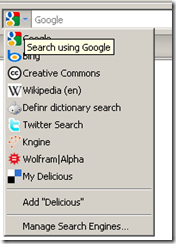
Using JavaScript to add the provider: The other available option is to add the provider using scripting, here’s an eg of how you can do that:
<a href="#" onclick="window.external.AddSearchProvider('http://localhost/SearchProviders/delicious.xml')">Add delicious Search to your browser</a>
Clicking a link like the one above will pop up a windows asking if you want to add the search provider.
References: http://www.opensearch.org
Friday, July 09, 2010
Changing regional settings for System accounts (including ASPNET) in Windows 7
One of the small issues I faced while switching my development machine to windows 7 was a bug/exception in an application I was working on in parsing date format.
After switching my regional settings to the “expected” format, I still got the same exception. After playing a little with the regional settings, I realized that I was switching only my account date format, not the whole machine's date format. To push those settings to other system accounts (like ASPNET, etc), I did the following steps:
After setting your your account regional settings, switch to “Administrative” tab:
From “Welcome screen and new user accounts”, click “Copy setting”:
Make sure “Welcome screen and system accounts” check box is checked, press ok, and Voila!
Monday, July 05, 2010
FCIH Initiative -- Students to Business
Thinking about your future? Worried about your career?
Thinking that you are far away from real market life and limited by your academic life?
Want to be professional but don't know where to start?
Interested to know how people work and deliver projects?
Need to gain experience in market? Need to know about Egyptian IT market?
FCIH Initiative is now here for you
Our goal is you, preparing for you, planning for you
Build your own market and Make companies sigh for you
This summer, we'll be together to make your dreams come true
To bridge your academic study to your career
Plan for your career right now
Meet your older colleagues and learn from them
Join us and enjoy:
Trainings – Research – Business Experience – Technical Knowledge – English Club - and more….
FCIH initiative program will start on 17-7, so don't miss the chance.
We're planning to provide:
· Technical sessions
· Training program in 3 tracks (java, .net, and PHP)
· Sessions talking about market, and adding to your personal skills.
· Program for those who are interested in research.
· Soft skills program.
· English club.
Now, don't worry about the future...Together we'll build a better tomorrow
Contacts:
Mail: FCIH.Initiative@fcih.net
Website: http://www.helwan.edu.eg:90/
Saturday, July 03, 2010
Customizing your eclipse download
Thursday, July 01, 2010
Downloading metacafe videos
wget --referer=http://s.mcstatic.com/Flash/vp/mc/Portal_3.2.1.1.swf @url -O `echo @url | sed 's%/%_%g'`.mp4
